
Reference Projects
A reference project is a documented case study of work you have delivered: its scope, timeframe, challenges, solutions, outcomes, contacts and the skills it used. Every reference project belongs to a customer, so you can find the right example when you write a proposal or fill out a consultant's CV (résumé). This page is the endpoint reference for reference projects. For the task-oriented walkthrough of a sync run, see Managing References.
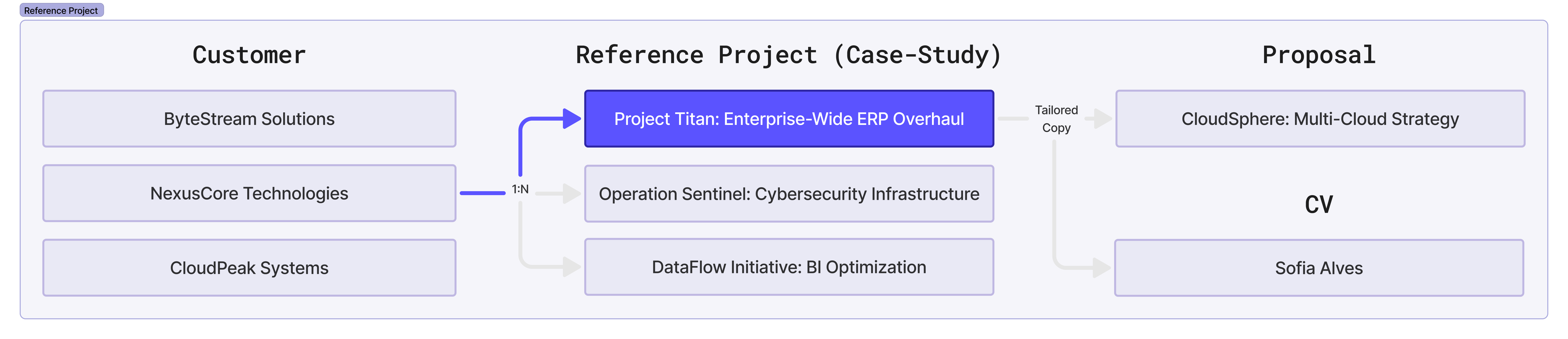
Some of the operations below also appear in the Integrations API reference, where you can see every field and response code and try a request. Where that is the case the section says so and links to it, rather than repeating the whole schema here.
Before you start
- Every request needs an
Authorizationheader, and requests with a body needContent-Type: application/json. See Authentication & Security. <customer_id>and<project_id>in the URLs below are internal Flowcase IDs. You can get them from Search reference projects, from Find a project by external ID, or from List projects for a customer.- Creating a project needs a key with the
referencemanagerorinternationalmanagerrole. Project owners can edit their own projects without either role, but only a key with the publish permission can move a project tolive. See Workflow stages. - Multilingual fields such as
project_name,project_descriptionandlabelhold an object keyed by language code. They use legacy codes by default (intfor international/English,nofor Norwegian). Passuse_legacy_codes=falseto read and write ISO 639-1 codes (en,no,sv) instead. Only the exact stringfalseturns this on. See Multilingual Text Fields and Country & Language Codes. - Updating a multilingual field replaces the whole object, so send every language you want to keep.
- Requests are rate limited per account. See Rate Limits.
Reference project structure
Project fields
- Basic info (architect, budget, location, timeframe)
- Project details (introduction, description, challenges, solutions)
- Business value and outcomes
- Client contacts and testimonials
- Skills and technologies used
What you can manage
- Search projects with filters
- Create, read, update and delete projects
- Workflow stages (draft, review, live)
- Project owners and access control
- Challenges and solutions
- Value propositions and benefits
- Customer contacts and approvals
- External links and resources
- Skills and competencies
- Project tagging and categorisation
- CV (résumé) integration
- File attachments
- Multilingual content
The top level fields live on the project itself and are set with Create and Update. Everything else is a sub-resource with its own endpoints, listed in the sections further down this page.
Search reference projects
The search endpoint takes a wide variety of filters to narrow down the results, in the same way as the web UI. The details of the search go in the body of the request.
POST https://<subdomain>.flowcase.com/api/v4/references/search
The endpoint returns a list of references holding a subset of each project's fields. To get the whole project, follow up with Get a reference project.
Request parameters
| Parameter | Description |
|---|---|
offset |
Numbering index for the starting point of the page. Default: 0 |
size |
Maximum number of items per page. You may receive fewer results than size. |
must |
The query clauses the project has to match. See the example below. |
workflow_stage_filter |
Limits the results to one workflow stage, for example live. See Workflow stages. |
filter_owned |
When true, limits the results to projects the key's user owns. See Project owners. |
offset, size and must follow the same pattern as the CV search, which has more clause examples.
Example: free-text search
This searches for a value across all fields and returns projects with partial matches.
POST https://<subdomain>.flowcase.com/api/v4/references/search
Request body
{
  "offset": 0,
  "size": 10,
  "must": [
    {
      "query": {
        "value": "test"
      }
    }
  ],
  "workflow_stage_filter": "live",
  "filter_owned": false
}
Response body
{
  "references": [
    {
      "reference": {
        "id": "PROJECT_ID",
        "external_unique_id": "EXTERNAL_UNIQUE_ID",

        "month_from": "1",
        "year_from": "2018",
        "month_to": "1",
        "year_to": "2020",
        "project_name": {
          "no": "PROJECT_NAME",
          "int": "PROJECT_NAME"
        },
        "project_introduction": { "int": "PROJECT_INTRODUCTION" },
        "company_customer_id": "CUSTOMER_ID",
        "customer_name": {
          "no": "CUSTOMER_NAME",
          "int": "CUSTOMER_NAME"
        },
        "industry": {
          "id": "INDUSTRY_MASTERDATA_ID",
          "section_type": "project_experiences",
          "field_name": "industry",
          "values": { "no": "INDUSTRY_NAME", "int": "INDUSTRY_NAME" },
          "external_unique_id": "INDUSTRY_EXTERNAL_ID"
        },
        "extent": "EXTENT",
        "extent_hours": "EXTENT_HOURS",
        "workflow_stage": "live", // draft, ready_for_review or live
        "image_count": 1
      },
      "preview_url": "/redirect/to/company_project?customer_id=CUSTOMER_ID&project_id=PROJECT_ID"
    }
  ],
  "total": 12, // projects matching the query AND the workflow_stage_filter
  "workflow_stage_counts": {
    "all": 382,
    "draft": 277,
    "live": 89,
    "ready_for_review": 16
  } // projects per stage, matching the query but ignoring workflow_stage_filter
}
The industry object is a masterdata record. See Masterdata for how to read and manage those.
Get a reference project
GET https://<subdomain>.flowcase.com/api/v2/company/cv/customers/<customer_id>/projects/<project_id>
The response holds the whole project, including every nested section: challenges, solutions, value propositions, customer contacts, project owners, skills, links, images, attachments, offices and custom tags. A fully populated project can exceed 20 KB. Pass include_project_sections=false to leave the nested arrays out when you only need the top level fields, and include_custom_fields=true to add the account's custom fields.
Who can read a project depends on its workflow stage. A live project is readable by most roles. A draft or ready_for_review project is readable only by its owners, by the referencemanager, internationalmanager and countrymanager roles, and by managers of the project's department.
Image and attachment URLs in the response are temporary links that expire about 10 minutes after the response is generated. Fetch the file rather than storing the URL, or request the project again for a fresh link.
This operation is in the Integrations API reference, which lists every field, including the sensitivity and anonymised variants and the custom field types.
Response body
{
  "id": "5b3c8bc872813c690502e373",
  "external_unique_id": "SAP-1234", // Object ID from the external source system
  "company_customer_id": "CUSTOMER_ID",
  "customer_name": { "int": "CUSTOMER_NAME" },

  "project_name": { "int": "Project name" },
  "project_introduction": { "int": "Project introduction text block" },
  "project_description": { "int": "Official project description for CVs" },
  "project_notes": { "int": "Project notes long text field" },
  "project_skills_description": { "int": "Skills used or acquired during the project" },
  "type": { "int": "Project Type" },
  "contract_type": { "int": "Development" },

  "architect": "4",
  "area_amt": "2564",
  "area_unit": "FTE",
  "building_owner": "Kranen Ger4",
  "collaborating_partners": "Royal Dutch Shell PLC - 302964 - 60%",
  "extent": "Project cost (free text)",
  "extent_amt": "2354",
  "extent_currency": "eur",
  "extent_hours_new": "2456.44", // Floating point number as a string
  "total_extent_amt": "54000000",
  "total_extent_currency": "nok",
  "total_extent_hours": "6.564577",
  "location_country_code": "pt", // country code
  "month_from": "9",
  "year_from": "2020",
  "month_to": "09",
  "year_to": "2022",
  "project_address": "Bergen",
  "workflow_stage": "live", // draft, ready_for_review or live
  "version": 12,
  "updated_at": "2025-01-28T14:58:18.510Z",

  // One array per sub-resource. See the section for each below.
  "project_challenges": [],
  "project_solutions": [],
  "customer_value_propositions": [],
  "customer_contacts": [],
  "project_links": [],
  "company_project_skills": [],
  "project_owners": [],
  "offices": [],
  "attachments": [],
  "custom_tags": [],

  // Read only image lists
  "project_introduction_images": [],
  "project_challenges_images": [],
  "project_solutions_images": [],
  "customer_value_propositions_images": []
}
Images
The four *_images arrays are read only in the project payload: you cannot set them through the create or update body. Each entry pairs a caption with the image itself:
{
  "id": "67976df7ce202600436f28de",
  "image_id": "67976df67624a04e85a40438",
  "caption": {
    "int": "Image caption"
  },
  "image": {
    "id": "67976df67624a04e85a40438",
    "url": "Temporary download link"
  }
}
Find a project by external ID
If your source system holds its own identifier for each project, look the project up by that instead. You do not need to know the parent customer.
GET https://<subdomain>.flowcase.com/api/v2/company/cv/projects/find?external_unique_id=<external_id>
The search covers every project in the account and returns the same project object as above. An external_unique_id shared by more than one project returns 409 with a duplicate_project_ids array. This operation is in the Integrations API reference.
List projects for a customer
Returns every reference project that belongs to one customer.
GET https://<subdomain>.flowcase.com/api/v2/company/cv/projects?company_customer_id=<customer_id>
Query parameters
| Parameter | Description |
|---|---|
company_customer_id |
ID of the customer whose projects you want. Required. |
Response body
{
  "projects": [
    // List of projects. See "Get a reference project" above for the shape of each one.
  ]
}
Use this before deleting a customer: you have to delete all of its projects first. Customers covers the order of those calls.
Create a reference project
Creates a project under an existing customer. Set the top level fields in this request. Details such as challenges, solutions, customer contacts, owners and tags are added afterwards, each with its own endpoint.
POST https://<subdomain>.flowcase.com/api/v2/company/cv/customers/<customer_id>/projects
You only have to provide the fields you wish to populate, others can be omitted. The fields are wrapped in a company_project object, and at least one field has to be present.
Request body
{
  "company_project": {
    "external_unique_id": "SAP-1234", // Object ID from the external source system

    "architect": "4",
    "area_amt": "2564",
    "area_unit": "FTE",
    "building_owner": "Building owner",
    "collaborating_partners": "Partners",
    "contract_type": {
      "int": "Development",
      "de": "Entwicklung"
    },
    "extent": "Project cost (free text)",
    "extent_amt": "2354",
    "extent_currency": "eur", // currency code, lower case
    "extent_hours_new": "2456.44", // Floating point number as a string
    "total_extent_amt": "54000000",
    "total_extent_currency": "nok",
    "total_extent_hours": "6.564577",
    "location_country_code": "pt", // country code
    "month_from": "9",
    "year_from": "2020",
    "month_to": "09",
    "year_to": "2022",
    "project_address": "Bergen",
    "workflow_stage": "draft", // draft, ready_for_review or live
    "project_description": {
      "int": "Official project description for CVs",
      "no": "Offisiell prosjektbeskrivelse for CV-er"
    },
    "project_introduction": {
      // Long text field for the project introduction
      "int": "Project introduction text block",
      "de": "Projekteinführung Textblock"
    },
    "project_name": {
      "int": "Project name"
    },
    "project_notes": {
      "int": "Project notes long text field",
      "no": "Prosjektnotater lang tekstfelt"
    },
    "type": {
      "int": "Project Type",
      "no": "Prosjekttype"
    },
    "office_ids": ["ABCDEF000000000000ABCDEF", "CDCDEF000000000000CDCDEF"],
    "project_skills_description": {
      "int": "Skills used or acquired during the project. Long form description field.",
      "de": "Fähigkeiten, die während des Projekts verwendet oder erworben wurden."
    }
  }
}
Response
A successful create returns 200, not 201, and the body is the whole project as shown in Get a reference project. Three things happen automatically:
- One empty entry is created in each of
project_challenges,project_solutions,customer_value_propositionsandcustomer_contacts. Update those entries rather than adding a second one if you only need one of each. - The key user's default office is assigned to the project.
- Any company language missing from
project_nameis filled in with the first value you supplied.
Currency codes have to be lower case, so "nok" and not "NOK". office_ids is accepted on create only. Add and remove offices later with the Offices endpoints.
This operation is in the Integrations API reference, which lists every accepted field, including the custom field, sensitivity and anonymised variants, and every validation error.
Update a reference project
PUT https://<subdomain>.flowcase.com/api/v2/company/cv/customers/<customer_id>/projects/<project_id>
The body uses the same company_project wrapper as Create and has to hold at least one field. Only the fields you send are changed, and the rest keep their current values. Multilingual fields are replaced whole, so updating project_name with {"int": "New"} drops any no value it held.
Request body
{
  "company_project": {
    "project_name": {
      "int": "Project name",
      "no": "Prosjektnavn"
    },
    "workflow_stage": "live"
  }
}
Response
The whole project, with version incremented by one.
Two differences from create: office_ids is silently ignored here rather than rejected, so the request still returns 200 and the offices are left unchanged. Use the Offices endpoints instead, and moving workflow_stage to live needs the publish permission. Owners who only hold the consultant or limited_access role can edit every other field but cannot publish.
This operation is in the Integrations API reference.
Delete a reference project
DELETE https://<subdomain>.flowcase.com/api/v2/company/cv/customers/<customer_id>/projects/<project_id>
The response is 204 No Content with an empty body.
To delete a customer you have to delete all of its projects first. Managing References walks through that order.
Workflow stages
workflow_stage controls who can see a project. New projects are draft unless you set something else.
| Stage | Description |
|---|---|
draft |
Only visible to project owners and administrators. |
ready_for_review |
Flagged for review before publishing. |
live |
Visible to all users in the account. |
Set the stage on Create or Update:
{
  "company_project": {
    "workflow_stage": "live"
  }
}
Moving a project to live needs the publish permission. A value outside the three above returns 422.
The stage also governs who can read the project: live projects are readable by most roles, while draft and ready_for_review projects are readable only by their owners, by the referencemanager, internationalmanager and countrymanager roles, and by managers of the project's department. Search reference projects takes a workflow_stage_filter and returns a count per stage, which is the quickest way to see how many projects are still unpublished.
Managing References covers publishing as part of a sync run.
Project owners
A project can have several owners. Project owners have additional access rights, so they can edit the project without the admin or reference manager roles. That lets regular or limited users collaborate without full administrative access.
An owner entry in the project response is the user object:
{
  "id": "5b05817550b0280e8d65dd22",
  "email": "example@example.com",
  "external_unique_id": null,
  "name": "Navn Navnesen",
  "office_id": "584029f42c04d6528e1ccbbb",
  "office_name": "Oslo",
  "role": "internationalmanager",
  "title": {
    "int": "Project Manager"
  }
}
Add project owners
POST https://<subdomain>.flowcase.com/api/v2/company/cv/customers/<customer_id>/projects/<project_id>/project_owners
Request body
{ "user_ids": ["<flowcase_user_id>"] }
Note there is no wrapper object here. Add several owners at once by listing more IDs in user_ids. To find a user ID, use Find a user or Search users.
The response is the whole project with the updated project_owners array, and the status is 200. An empty user_ids array succeeds and changes nothing. Adding a user who is already an owner returns 422. Deactivated users can be added, and come back with deactivated: true, so filter them out yourself if your integration should not assign them.
This operation is in the Integrations API reference.
Sync project owners by email
If your identity source keys on email rather than a Flowcase user ID, sync the whole owner list in one call.
PUT https://<subdomain>.flowcase.com/api/v2/company/cv/customers/<customer_id>/projects/<project_id>/project_owners/sync_by_email
Request body
{
  "emails": ["alice@example.com", "bob@example.com"],
  "replace": false
}
replace: false, the default, adds the listed users to the current owners. replace: true makes the owner list exactly the users the emails resolve to, removing the rest. The call is all or nothing: one unmatched email fails the whole request with 422 and changes no owners. A project always needs at least one owner, so replace: true with an empty list also returns 422.
This operation is in the Integrations API reference, which covers email normalisation and the permissions each mode needs.
Remove a project owner
DELETE https://<subdomain>.flowcase.com/api/v2/company/cv/customers/<customer_id>/projects/<project_id>/project_owners/<user_id>
user_id is the id of an entry in the project's project_owners array.
The response is 204 No Content with an empty body. The call is not idempotent: removing a user who is not currently an owner, which includes repeating a successful removal, returns 500. This operation is in the Integrations API reference.
Project challenges
The key challenges the project faced. A project can hold several.
An entry in the project response looks like this:
{
  "id": "5d6f90de26bdef0d44b3edff",
  "reference_project_id": "5b3c8bc872813c690502e373",

  "label": {
    // label used for annotating different description variants (optional)
    "int": "Emphasise project management challenges",
    "pl": "Wyzwania w zarzadzaniu projektem"
  },
  "value": {
    "int": "Long text field for challenge description."
  },
  "disabled": false, // include in reference
  "version": 1
}
disabled: true keeps the entry out of published references.
Add a project challenge
POST https://<subdomain>.flowcase.com/api/v2/company/cv/customers/<customer_id>/projects/<project_id>/project_challenges
Request body
{
  "project_challenge": {
    "label": {
      // label used for annotating different description variants (optional)
      "int": "Emphasise project management challenges",
      "pl": "Wyzwania w zarzadzaniu projektem"
    },
    "value": {
      "int": "Long text field for challenge description."
    },
    "disabled": false // include in reference
  }
}
Response
The created challenge, with its server-assigned id. Keep that id: you need it to update or delete the entry. Creating a project already creates one empty challenge, so update that entry instead of adding a second one if you only need one.
Update a project challenge
PUT https://<subdomain>.flowcase.com/api/v2/company/cv/customers/<customer_id>/projects/<project_id>/project_challenges/<challenge_id>
challenge_id is the id returned when you created the entry, and is also in the project's project_challenges array.
This endpoint supports partial updates, so you can change label, value or disabled on their own. A multilingual attribute such as {"label": {"int": "value", "es": "value"}} overwrites the whole label object. See Multilingual Text Fields.
Request body
{
  "project_challenge": {
    "label": {
      "int": "Emphasise project management challenges",
      "pl": "Wyzwania w zarzadzaniu projektem"
    },
    "value": {
      "int": "Long text field for challenge description."
    },
    "disabled": false // include in reference
  }
}
Response
The updated challenge, with version incremented.
Delete a project challenge
DELETE https://<subdomain>.flowcase.com/api/v2/company/cv/customers/<customer_id>/projects/<project_id>/project_challenges/<challenge_id>
The response is 204 No Content with an empty body.
Project solutions
The solutions the project implemented. A project can hold several. Entries have the same shape as project challenges:
{
  "id": "5b3c8bc872813c690502e379",
  "reference_project_id": "5b3c8bc872813c690502e373",
  "label": {
    // label used for annotating different description variants (optional)
    "int": "Data warehouse",
    "pl": "Hurtownia danych"
  },
  "value": {
    "int": "Long text field for solution description."
  },
  "disabled": false, // include in reference
  "version": 1
}
Add a project solution
POST https://<subdomain>.flowcase.com/api/v2/company/cv/customers/<customer_id>/projects/<project_id>/project_solutions
Request body
{
  "project_solution": {
    "label": {
      // label used for annotating different description variants (optional)
      "int": "Data warehouse",
      "pl": "Hurtownia danych"
    },
    "value": {
      "int": "Long text field for solution description."
    },
    "disabled": false // include in reference
  }
}
Response
The created solution, with its server-assigned id.
Update a project solution
PUT https://<subdomain>.flowcase.com/api/v2/company/cv/customers/<customer_id>/projects/<project_id>/project_solutions/<solution_id>
solution_id is the id returned when you created the entry, and is also in the project's project_solutions array.
This endpoint supports partial updates, so you can change label, value or disabled on their own. A multilingual attribute such as {"label": {"int": "value", "es": "value"}} overwrites the whole label object. See Multilingual Text Fields.
Request body
{
  "project_solution": {
    "label": {
      "int": "Data warehouse",
      "pl": "Hurtownia danych"
    },
    "value": {
      "int": "Long text field for solution description."
    },
    "disabled": false // include in reference
  }
}
Delete a project solution
DELETE https://<subdomain>.flowcase.com/api/v2/company/cv/customers/<customer_id>/projects/<project_id>/project_solutions/<solution_id>
The response is 204 No Content with an empty body.
Customer value propositions
The value the project delivered to the customer. A project can hold several. Entries have the same shape as project challenges:
{
  "id": "5b3c8bc872813c690502e375",
  "reference_project_id": "5b3c8bc872813c690502e373",

  "label": {
    // label used for annotating different description variants (optional)
    "int": "Highlight savings",
    "pl": "Podkresla oszczednosci"
  },
  "value": {
    "int": "Long text field for value proposition description."
  },
  "disabled": false, // include in reference
  "version": 1
}
Add a customer value proposition
POST https://<subdomain>.flowcase.com/api/v2/company/cv/customers/<customer_id>/projects/<project_id>/customer_value_propositions
Request body
{
  "customer_value_proposition": {
    "label": {
      // label used for annotating different description variants (optional)
      "int": "Highlight savings",
      "pl": "Podkresla oszczednosci"
    },
    "value": {
      "int": "Long text field for value proposition description."
    },
    "disabled": false // include in reference
  }
}
Response
The created value proposition, with its server-assigned id.
Update a customer value proposition
PUT https://<subdomain>.flowcase.com/api/v2/company/cv/customers/<customer_id>/projects/<project_id>/customer_value_propositions/<customer_value_proposition_id>
customer_value_proposition_id is the id returned when you created the entry, and is also in the project's customer_value_propositions array.
This endpoint supports partial updates, so you can change label, value or disabled on their own. A multilingual attribute such as {"label": {"int": "value", "es": "value"}} overwrites the whole label object. See Multilingual Text Fields.
Request body
{
  "customer_value_proposition": {
    "label": {
      "int": "Highlight savings",
      "pl": "Podkresla oszczednosci"
    },
    "value": {
      "int": "Long text field for value proposition description."
    },
    "disabled": false // include in reference
  }
}
Delete a customer value proposition
DELETE https://<subdomain>.flowcase.com/api/v2/company/cv/customers/<customer_id>/projects/<project_id>/customer_value_propositions/<customer_value_proposition_id>
The response is 204 No Content with an empty body.
Project links
External resources related to the project. A project can hold several.
{
  "id": "6797705f0b68e00043af250d",
  "label": {
    "int": "Link label"
  },
  "url": "https://flowcase.com", // full URL required
  "disabled": false, // include in reference
  "version": 1
}
Add a project link
POST https://<subdomain>.flowcase.com/api/v2/company/cv/customers/<customer_id>/projects/<project_id>/project_links
Request body
{
  "project_link": {
    "label": {
      // label used for annotating different description variants (optional)
      "int": "Main website",
      "de": "Hauptwebsite"
    },
    "url": "https://flowcase.com", // full URL required
    "disabled": false // include in reference
  }
}
Response
The created link, with its server-assigned id.
Update a project link
PUT https://<subdomain>.flowcase.com/api/v2/company/cv/customers/<customer_id>/projects/<project_id>/project_links/<project_link_id>
project_link_id is the id returned when you created the entry, and is also in the project's project_links array.
This endpoint supports partial updates, so you can change label, url or disabled on their own. A multilingual attribute such as {"label": {"int": "value", "es": "value"}} overwrites the whole label object. See Multilingual Text Fields.
Request body
{
  "project_link": {
    "label": {
      "int": "Main website",
      "de": "Hauptwebsite"
    },
    "url": "https://flowcase.com", // full URL required
    "disabled": false // include in reference
  }
}
Delete a project link
DELETE https://<subdomain>.flowcase.com/api/v2/company/cv/customers/<customer_id>/projects/<project_id>/project_links/<project_link_id>
The response is 204 No Content with an empty body.
Company project skills
The skills used or acquired during the project. A project can hold several. Each entry is a multilingual name and a sort position:
{
  "id": "679773d9aaa700003a31e0da",
  "tags": {
    "int": "Project manager",
    "de": "Projektmanager"
  },
  "order": 0,
  "version": 1
}
These entries are separate from project_skills_description, the long form text field on the project itself, which you set with Update a reference project.
Add a project skill
POST https://<subdomain>.flowcase.com/api/v2/company/cv/customers/<customer_id>/projects/<project_id>/company_project_skills
Request body
{
  "company_project_skill": {
    "tags": {
      // skill name, multilingual
      "int": "Project management",
      "no": "Prosjektledelse"
    },
    "order": 5
  }
}
Both tags and order are optional, and language codes the account has not enabled are dropped from tags. The response is the created skill with its id, and the status is 200. This operation is in the Integrations API reference.
Update a project skill
PUT https://<subdomain>.flowcase.com/api/v2/company/cv/customers/<customer_id>/projects/<project_id>/company_project_skills/<company_project_skill_id>
company_project_skill_id is the id returned when you created the entry, and is also in the project's company_project_skills array.
This endpoint supports partial updates: omitting tags keeps the current name and omitting order keeps the current position. tags itself is replaced whole, so {"tags": {"int": "value", "es": "value"}} overwrites every language, and {"tags": {}} clears them all. See Multilingual Text Fields. This operation is in the Integrations API reference.
Delete a project skill
DELETE https://<subdomain>.flowcase.com/api/v2/company/cv/customers/<customer_id>/projects/<project_id>/company_project_skills/<company_project_skill_id>
The response is 204 No Content with an empty body.
Customer contacts
The customer's people on the project, with their contact details, quote and any notes. A project can hold several.
Three flags control what may be published, and all three default to true, which means nothing is approved. Set a flag to false to approve that part:
| Flag | Approves |
|---|---|
disabled |
Naming the contact in a reference. |
hide_contact_details |
Contacting the customer on email and phone. |
hide_quote |
Using the contact's quote. |
When a flag moves from true to false through Update a customer contact, the API records who approved and when. Setting a flag back to true does not clear those fields, so the last approver stays on the record. Approving on create does not fill them in.
An entry in the project response holds the flags, the approval trail and the content:
{
  "id": "6626270f3c0a3b377c68b822",
  "reference_project_id": "5b3c8bc872813c690502e373",

  "disabled": true, // false approves naming the contact in a reference. Default: true
  "name_approved_at": "2024-04-22T09:00:10.165Z",
  "name_approver_id": "6527c07c36f8fc003a52a41e",
  "name_approver_name": "Nil Freeman",
  "name": "John Doe",
  "label": {
    "int": "Project Manager",
    "no": "Prosjektleder"
  },

  "hide_contact_details": true, // false approves contacting the customer. Default: true
  "contact_details_approved_at": "2025-01-06T12:21:26.000Z",
  "contact_details_approver_id": "62a8701f9f904810299699b2",
  "contact_details_approver_name": "Tollef Jensen",
  "email": "john.doe@example.com",
  "phone": "+1234567890",

  "hide_quote": true, // false approves using the quote. Default: true
  "quote_approved_at": "2024-07-03T11:12:13.695Z",
  "quote_approver_id": "657874edfbdaec0031192f41",
  "quote_approver_name": "Jane Doe",
  "quote": {
    "int": "Success is not final, failure is not fatal: It is the courage to continue that counts.",
    "no": "Suksess er ikke endelig, fiasko er ikke dødelig: Det er motet til å fortsette som teller."
  },

  "notes": {
    "int": "John Doe has over 10 years of experience in project management and has successfully led multiple high-profile projects.",
    "no": "John Doe har over 10 års erfaring innen prosjektledelse og har ledet flere vellykkede prosjekter."
  }
}
Add a customer contact
POST https://<subdomain>.flowcase.com/api/v2/company/cv/customers/<customer_id>/projects/<project_id>/customer_contacts
Request body
{
  "customer_contact": {
    "disabled": true, // false approves naming the contact in a reference. Default: true

    "name": "John Doe",
    "label": {
      "int": "Project Manager",
      "no": "Prosjektleder"
    },

    "hide_contact_details": true, // false approves contacting the customer. Default: true
    "email": "john.doe@example.com",
    "phone": "+1234567890",

    "hide_quote": true, // false approves using the quote. Default: true
    "quote": {
      "int": "Success is not final, failure is not fatal: It is the courage to continue that counts.",
      "no": "Suksess er ikke endelig, fiasko er ikke dødelig: Det er motet til å fortsette som teller."
    },

    "notes": {
      "int": "John Doe has over 10 years of experience in project management and has successfully led multiple high-profile projects.",
      "no": "John Doe har over 10 års erfaring innen prosjektledelse og har ledet flere vellykkede prosjekter."
    }
  }
}
The response is the created contact with its id, and the status is 200. The approval fields come back null, even if you sent the flags as false. Creating a project already creates one empty contact, so update that entry instead of adding a second one if you only need one. This operation is in the Integrations API reference.
Update a customer contact
PUT https://<subdomain>.flowcase.com/api/v2/company/cv/customers/<customer_id>/projects/<project_id>/customer_contacts/<customer_contact_id>
customer_contact_id is the id returned when you created the entry, and is also in the project's customer_contacts array.
This endpoint supports partial updates, so you can change one field at a time. The multilingual fields label, quote and notes are each replaced whole, so send every language you want to keep. See Multilingual Text Fields.
Use this call to record approvals:
{
  "customer_contact": {
    "disabled": false,
    "hide_contact_details": false,
    "hide_quote": false
  }
}
The response holds the contact with the approver fields filled in for every flag that moved from true to false. This operation is in the Integrations API reference.
Delete a customer contact
DELETE https://<subdomain>.flowcase.com/api/v2/company/cv/customers/<customer_id>/projects/<project_id>/customer_contacts/<customer_contact_id>
The response is 204 No Content with an empty body.
Attachments
Attach further documents and files to the project.
You can upload the following file types:
- Documents:
.doc,.docx,.odt,.pdf - Presentations:
.ppt,.pptx - Spreadsheets:
.xls,.xlsx - Images:
.svg,.png,.jpg,.jpeg,.gif - Archives:
.zip - Videos:
.webm,.mpg,.mp2,.mpeg,.mpe,.mpv,.mp4,.m4p,.m4v,.ogg,.avi,.mov,.wmv
The maximum file size allowed for uploads is 100 MB.
An attachment in the project response carries its label and a temporary download link:
{
  "id": "63f5f235a1e8f70fd3723b63", // object ID
  "label": "pictures ", // UI label
  "file": {
    "extension": "jpeg", // file extension
    "url": "Temporary download link" // expires after about 10 minutes
  }
}
Upload an attachment
POST https://<subdomain>.flowcase.com/api/v2/company/cv/customers/<customer_id>/projects/<project_id>/attachments
Request body
Send the body as multipart/form-data with the file in attachment[file]. Below is an example using curl:
curl -v -X POST 'https://<subdomain>.flowcase.com/api/v2/company/cv/customers/<customer_id>/projects/<project_id>/attachments' \
  -H 'Authorization: Bearer <your-api-key>' \
  -H 'Content-Type: multipart/form-data' \
  -F 'attachment[file]=@/path/to/your/file'
Replace <subdomain>, <customer_id>, <project_id>, <your-api-key> and /path/to/your/file with your own values.
Response
A successful response is 200 OK with a confirmation body only:
{
  "message": "ok"
}
The response does not include the attachment ID. To get it, read the project again and
take the id from the attachments array, which also carries the label and a signed
file.url:
{
  "attachments": [
    {
      "id": "ATTACHMENT_ID",
      "label": "N/A",
      "file": { "url": "https://...s3...amazonaws.com/...?X-Amz-Expires=600&..." }
    }
  ]
}
You need that id to delete the attachment. Attachment file.url values are signed and
expire after 10 minutes, so fetch the file rather than storing the URL.
Only these file types are accepted: doc, docx, odt, pdf, ppt, pptx, xls,
xlsx, svg, zip, png, jpg, jpeg, gif, webm, mpg, mp2, mpeg, mpe,
mpv, mp4, m4p, m4v, ogg, avi, mov, wmv. Anything else returns 422 with
the allowed list in details.
Delete an attachment
DELETE https://<subdomain>.flowcase.com/api/v2/company/cv/customers/<customer_id>/projects/<project_id>/attachments/<attachment_id>
attachment_id is the id of an entry in the project's attachments array.
The response is 204 No Content with an empty body.
Custom tags
Custom tags categorise projects with your own taxonomy. A tag entry in the project response carries its category:
{
  "id": "62f0cf5f869255103eb11c5a",
  "custom_tag_category_id": "62f0cf4ce3e6a50ffa5a1e04",
  "external_unique_id": "Source system ID",
  "values": {
    "int": "Tag value"
  },
  "custom_tag_category": {
    "id": "62f0cf4ce3e6a50ffa5a1e04",
    "values": {
      "int": "Tag category name"
    },
    "external_unique_id": "Source system ID"
  }
}
Create the tag and its category first with the Custom Tags endpoints, then attach the tag to the project.
Add a custom tag to a project
POST https://<subdomain>.flowcase.com/api/v2/company/cv/customers/<customer_id>/projects/<project_id>/custom_tags
Request body
{
  "custom_tag_category_id": "CUSTOM_TAG_CATEGORY_ID",
  "custom_tag_id": "CUSTOM_TAG_ID"
}
The response is the whole updated project. The call is not idempotent: adding a tag that is already on the project returns 422. For the tag to appear in the project's custom_tags array its category needs can_be_used_for_references: true, although the API does not enforce this when you write.
Remove a custom tag from a project
DELETE https://<subdomain>.flowcase.com/api/v2/company/cv/customers/<customer_id>/projects/<project_id>/custom_tags/<custom_tag_id>
custom_tag_id is the id of an entry in the project's custom_tags array.
The response is 204 No Content with an empty body. The call is not idempotent: removing a tag that is not on the project returns 404.
Both operations are in the Integrations API reference, and Tags on reference projects covers the permissions they need.
Offices
Offices tie a project to the departments that delivered it. An office in the project response looks like this:
{
  "id": "584029f42c04d6528e1ccbbb",
  "country_id": "584029f42c04d6528e1ccbb9",
  "country_code": "no", // country code
  "name": "Oslo",
  "selected": false,

  "default_indesign_template_id": null,
  "default_ppt_template_id": null,
  "default_word_json_template_id": null,
  "default_word_template_id": null,
  "override_language_code": null
}
Creating a project assigns the key user's default office. Use Countries & Departments to look up a country_id and an office_id.
Add an office to a project
POST https://<subdomain>.flowcase.com/api/v2/company/cv/customers/<customer_id>/projects/<project_id>/offices
Request body
{
  "country_id": "COUNTRY_ID",
  "office_id": "OFFICE_ID"
}
Both fields are required and neither is wrapped. The office has to belong to the country you name: an office in a different country returns 404, as does a missing or unknown ID. Adding an office the project already has returns 422.
The response is the whole project with the updated offices array, and the status is 200. This operation is in the Integrations API reference.
Remove an office from a project
DELETE https://<subdomain>.flowcase.com/api/v2/company/cv/customers/<customer_id>/projects/<project_id>/offices/<office_id>
office_id is the id of an entry in the project's offices array.
The response is 204 No Content with an empty body.
Find CVs of users on a reference project
Returns the users whose CV holds a project experience matching the reference project's customer name and project name in the given language.
GET https://<subdomain>.flowcase.com/api/v2/company/cv/customers/unapproved/project_experiences/project_description?country_code=<language_code>&customer_id=<customer_id>&project_id=<project_id>
Query parameters
| Parameter | Description |
|---|---|
country_code |
The language to match on, given as a legacy language code such as int. Named country_code for historical reasons. See Country & Language Codes. |
customer_id |
ID of the customer the project belongs to. |
project_id |
ID of the reference project. |
Response body
The matching users are grouped by the project description on their own project experience.
[
  {
    "project_description": "<project_description_1>",
    "count": 15,
    "users": [
      {
        "id": "<user_id>",
        "name": "<name>",
        "cv_id": "<cv_id>",
        "image": {
          // image URLs
        }
      }
      // More users
    ]
  },
  {
    "project_description": "<project_description_2>",
    "count": 3,
    "users": [
      {
        "id": "<user_id>",
        "name": "<name>",
        "cv_id": "<cv_id>",
        "image": {}
      }
      // More users
    ]
  }
  // More users by project description
]
Call this before Assign a project to CVs to see who already has the project, and before Overwrite a project description in CVs to read the exact description each CV holds.
Assign a project to CVs
Assigns a reference project to the master CV (résumé) of the users you list.
POST https://<subdomain>.flowcase.com/api/v2/company/cv/customers/<customer_id>/projects/<project_id>/consultants
Request body
One project per request, but as many CVs (résumés) as you like.
{
  "user_ids": ["<user_id>"],
  "notify_by_email": false, // optional, default: false
  "include_dates": true, // optional, default: false
  "customer_contact_ids": [], // optional
  "project_image_ids": [] // optional
}
To check before you assign, use Find CVs of users on a reference project.
Response body
The CVs (résumés) that were updated.
{
  "updated_cvs": [
    {
      "user_id": "<user_id>",
      "cv_id": "<cv_id>",
      "name": "<name>"
    }
  ]
}
Overwrite a project description in CVs
Overwrites the description of a reference project on the master CV (résumé) of the users you list.
PUT https://<subdomain>.flowcase.com/api/v2/update-terms/<language_code>/project_experiences/long_description
The <language_code> segment names the language the description is written in, as a legacy language code such as int. See Country & Language Codes.
Request body
One description per request, but as many CVs (résumés) as you like.
{
  "original_value": "<original_description>",
  "new_value": "<new_description>", // optional
  "customer_id": "<customer_id>",
  "project_id": "<project_id>",
  "limit_to_user_ids": ["<user_id>"]
}
original_value has to match the value in the target CV (résumé) exactly. If it does not match, the CV (résumé) is not updated and the error is silent. To read the description a CV (résumé) holds, use Find CVs of users on a reference project.
Response body
The list of CVs (résumés) that were updated. It comes back empty because the work runs in the background.
{
  "updated_cvs": []
}
Synchronise project fields to CVs
Resets the values on every CV (résumé) that refers to the project so they match the reference project. Use it to keep the two consistent.
PUT https://<subdomain>.flowcase.com/api/v2/company/cv/customers/project_experiences/synchronise
Request body
One project per request. Every CV with a project experience matching the reference project is updated. Matching uses the customer and project name in the language given by language_code, which takes one of our legacy language codes.
field_group controls which fields are updated. The available groups are dates, industry, project_extent_hours, total_extent_hours, project_extent, total_extent, area, type, location_country_code, project_address, contract_type and all.
{
  "customer_id": "<customer_id>",
  "project_id": "<project_id>",
  "language_code": "<language_code>",
  "field_group": "all"
}
Response body
The CVs (résumés) that were updated, with a count of those changed, left alone, and not writable.
// Example of a response code 200
{
  "changed": 1,
  "unchanged": 3,
  "cannot_write": 0,
  "updated_cvs": [
    {
      "user_id": "<user_id>",
      "cv_id": "<cv_id>",
      "name": "<name>"
    }
  ]
}
Response codes
| Status | Meaning |
|---|---|
| 200 | The call succeeded. Create calls return 200, not 201. |
| 204 | The record was deleted. Empty body. |
| 400 | The body is empty, the wrapper object is missing or empty, or the body could not be parsed. |
| 401 | Missing or invalid authentication. |
| 403 | The API key is disabled, or the user lacks the role the operation needs. Creating a project needs referencemanager or internationalmanager, and publishing needs the publish permission. |
| 404 | The customer, project, sub-resource, user, country or office does not exist, or a required body field is missing. |
| 409 | On find by external ID, more than one project shares the external_unique_id. |
| 422 | A value failed validation, for example a workflow_stage outside the three allowed values, a month_from above 12, an upper case currency code, or a duplicate owner, office or tag. |
| 429 | Rate limit exceeded. See Rate Limits. |
| 500 | Removing a project owner who does not own the project. |
Error message strings come back in the account's language, so branch on the status code and the response keys, not on the text.
See Errors & Response Codes for the full list of status codes the API returns.
What's next
- Managing References walks through a full customer and reference project sync, step by step.
- Customers covers the customer each project hangs off.
- Custom Tags covers building the taxonomy you tag projects with.
- Reference Project Reports exports project data in bulk.
- Proposals covers the tailored copies made when a project goes into a proposal.
- The Integrations API reference lists every field and response code for the operations it covers, and lets you try a request.