
Customers
Flowcase stores customers centrally, so you can hang reference projects off them, cite them in proposals, and standardise how they appear in consultants' CVs (résumés). This page is the endpoint reference for customers. For the task-oriented walkthrough of a sync run, see Managing References.
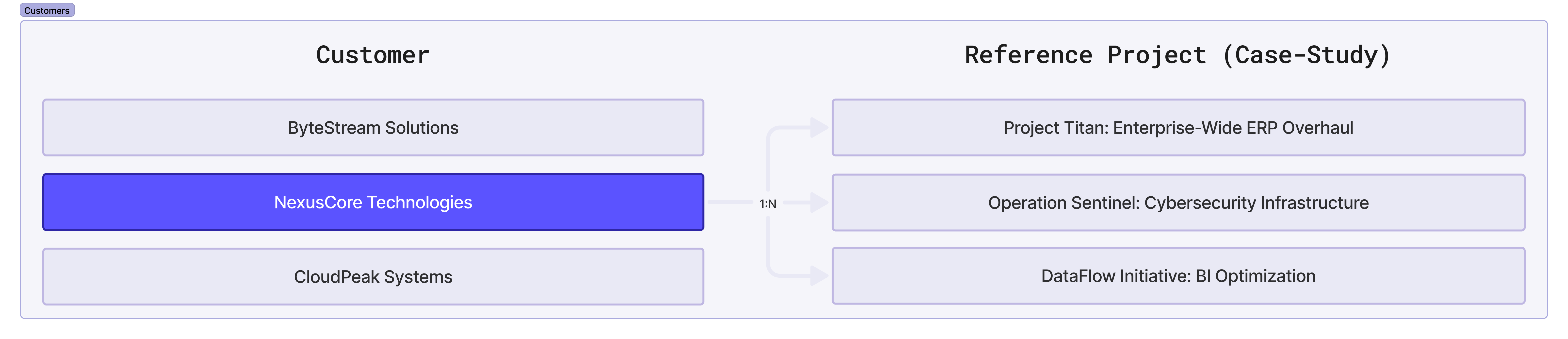
Every customer belongs to one account, and every reference project belongs to one customer. So a sync always starts here: find or create the customer, then work on its projects.
All requests need an Authorization header, and requests with a body need Content-Type: application/json. See Authentication & Security for details.
Multilingual fields such as customer_name, customer_description and customer_description_to_cvs hold an object keyed by language code. They use legacy codes by default (int for international/English, no for Norwegian). The create and find endpoints accept use_legacy_codes=false, which switches both request parsing and the response to ISO 639-1 codes (en, no, sv). Only the exact string false turns this on. See Multilingual Text Fields and Country & Language Codes.
Look up customers
List customers
GET https://<subdomain>.flowcase.com/api/v2/company/cv/customers?customer_name=CUSTOMER_NAME&size=10&offset=0
| Parameter | Description |
|---|---|
customer_name |
Filters customers by a partial match on the name. |
size |
Number of results to return. |
offset |
Index of the first result, so you can page through the list. |
Response body
{
  "customers": [
    {
      "id": "610d12a9c596a610e03cbe0a",
      "company_id": "629d0db2878f992c53183f64",
      "created_at": "2021-08-06T10:44:57.156Z",
      "updated_at": "2022-06-14T12:22:41.896Z",
      "version": 3,
      "customer_name": {
        "int": "Acme Corporation"
      },
      "customer_name_anonymized": {},
      "customer_description": {},
      "customer_description_anonymized": {},
      "customer_description_to_cvs": {},
      "customer_sensitivity": null,
      "customer_url": "https://example.com",
      "external_unique_id": "EXT-1234",
      "image": {
        "url": null,
        "thumb": { "url": null },
        "fit_thumb": { "url": null },
        "large": { "url": null },
        "small_thumb": { "url": null }
      },
      "image_height": null,
      "image_width": null,
      "masterdata_industry_id": null,
      "project_count": 5,
      "custom_tags": [],
      "industry": null
      // some fields omitted
    }
    // more customers
  ]
}
See Customer fields for what each field holds.
Get a customer by ID
GET https://<subdomain>.flowcase.com/api/v2/company/cv/customers/<customer_id>
Response body
A single customer object, the same shape as one entry in the list above.
{
  "id": "610d12a9c596a610e03cbe0a",
  "company_id": "629d0db2878f992c53183f64",
  "created_at": "2021-08-06T10:44:57.156Z",
  "updated_at": "2022-06-14T12:22:41.896Z",
  "version": 3,
  "customer_name": {
    "int": "Acme Corporation"
  },
  "customer_name_anonymized": {},
  "customer_description": {},
  "customer_description_anonymized": {},
  "customer_description_to_cvs": {},
  "customer_sensitivity": null,
  "customer_url": "https://example.com",
  "external_unique_id": "EXT-1234",
  "image": {
    "url": null,
    "thumb": { "url": null },
    "fit_thumb": { "url": null },
    "large": { "url": null },
    "small_thumb": { "url": null }
  },
  "image_height": null,
  "image_width": null,
  "masterdata_industry_id": null,
  "project_count": 5,
  "custom_tags": [],
  "industry": null
  // some fields omitted
}
Find a customer by external unique ID
If your own system assigns a stable ID to each customer, store it as external_unique_id and look the customer up by it. This is the sync key: it saves you searching by name and creating duplicates.
GET https://<subdomain>.flowcase.com/api/v2/company/cv/customers/find?external_unique_id=<customer_external_unique_id>
The external_unique_id parameter is required, and the match is exact. The response body is the same as getting a customer by ID.
A missing or unmatched value returns an error rather than an empty list:
- 404: no customer in the account carries that
external_unique_id. The body is empty. - 400: the
external_unique_idparameter was omitted, or more than one customer carries the value.
The API does not stop you creating two customers with the same external_unique_id, so the find endpoint can hit a duplicate. When it does, the 400 body lists the conflicting records:
{
  "error": "More than one customer was found when looking up by external_unique_id",
  "duplicate_customer_ids": [
    "646cd3a1a205f30f4a8dabf7",
    "65b0fee20e6acb003a1dfde9"
  ]
}
The error string is returned in the account's language, so match on the 400 status and the presence of duplicate_customer_ids rather than on the text. A missing parameter returns error on its own, with no duplicate_customer_ids key.
Customer fields
| Field | Description |
|---|---|
id |
Customer identifier. |
company_id |
Identifier of the account that owns the customer. |
created_at |
When the customer was created. |
updated_at |
When the customer was last updated. |
version |
Version counter. Increments on each update. |
customer_name |
Multilingual customer name. |
customer_name_anonymized |
Anonymised name, used when customer_sensitivity is anonymized. Empty object if not set. |
customer_description |
Multilingual description of the customer. Empty object if not set. |
customer_description_anonymized |
Anonymised description. Empty object if not set. |
customer_description_to_cvs |
Multilingual description shown on CVs that reference this customer. Empty object if not set. |
customer_sensitivity |
confidential hides the customer name in public views. anonymized swaps in the anonymised name. null when not classified. |
customer_url |
Customer website. Null if not set. |
external_unique_id |
Your own identifier for the customer, and the key the find endpoint uses. Null if not set. |
image |
Customer logo, with a URL per size: url, thumb, fit_thumb, large and small_thumb. Every URL is null until a logo is uploaded. |
image_height |
Logo height in pixels. Null when no logo has been uploaded. |
image_width |
Logo width in pixels. Null when no logo has been uploaded. |
masterdata_industry_id |
Identifier of the industry assigned to the customer. Null if none is assigned. |
project_count |
Number of reference projects linked to the customer. |
custom_tags |
Custom tags applied to the customer, from categories set up for customer use. Empty array if none. |
industry |
The industry record in full. Null if none is assigned. masterdata_industry_id holds the same ID as a plain string. |
The anonymised fields are only available on accounts with anonymisation switched on. Contact support to enable it.
Logo URLs are signed and expire after about 20 minutes. Cache the image if you need to display it, or fetch the customer again for a fresh URL.
custom_tags entries and the industry object look like this:
{
  "custom_tags": [
    {
      "id": "64ba9ea58e11ef0f4ecc0768",
      "values": { "int": "Production" },
      "external_unique_id": "",
      "custom_tag_category_id": "64ba9d878e11ef0f45cc0768",
      "category_ids": ["64ba9d878e11ef0f45cc0768"]
    }
  ],
  "industry": {
    "id": "63b563fa0ff7255c26324ac5",
    "section_type": "project_experiences",
    "field_name": "industry",
    "values": { "int": "Transport" },
    "external_unique_id": null,
    "help_text": {}
  }
}
Manage customers
Creating a customer needs the referencemanager or internationalmanager role. An API key without either role gets a 403.
Create a customer
POST https://<subdomain>.flowcase.com/api/v2/company/cv/customers
Request body
Wrap the fields in a company_customer object. customer_name with at least one language entry is the only field you must send. An empty body, a missing wrapper, or an empty wrapper returns a 400.
{
  "company_customer": {
    "external_unique_id": "1234",
    "customer_name": {
      "int": "Test customer",
      "no": "Test customer"
    },
    "customer_description": {
      "int": "Description",
      "no": "Description"
    },
    "customer_description_to_cvs": {
      "int": "Description",
      "no": "Description"
    },
    "customer_url": "https://example.com",
    "industry_id": "<industry_id>"
  }
}
| Field | Description |
|---|---|
customer_name |
Required. Multilingual name. Company language codes you leave out are filled with the first value you supply. |
customer_name_anonymized |
Anonymised name. Missing language codes are not filled in for you. |
customer_description |
Multilingual description of the customer. |
customer_description_anonymized |
Anonymised description. |
customer_description_to_cvs |
Multilingual description shown on CVs that reference this customer. |
customer_url |
Customer website. Must be a valid http:// or https:// URL. An invalid URL is stored as an empty string. |
external_unique_id |
Your own identifier for the customer, and the key the find endpoint uses. |
industry_id |
Identifier of an industry in the account. See the Masterdata guide for how to list industries. |
customer_sensitivity |
anonymized or confidential. Any other value returns a 422. |
The anonymised fields are only available on accounts with anonymisation switched on.
Response body
A successful create returns 200, not 201, and the new customer object. That object leaves out project_count and industry, which the read endpoints include. version is 1, and custom_tags is an empty array.
Store the external_unique_id you sent, so later sync runs match the existing customer instead of creating a second one.
Update a customer
PUT https://<subdomain>.flowcase.com/api/v2/company/cv/customers/<customer_id>
Request body
Send only the fields you want to change, wrapped in the same company_customer object as create.
{
  "company_customer": {
    "external_unique_id": "1234",
    "customer_name": {
      "int": "Test customer",
      "no": "Test customer"
    },
    "customer_description": {
      "int": "Description",
      "no": "Description"
    },
    "customer_description_to_cvs": {
      "int": "Description",
      "no": "Description"
    },
    "customer_url": "https://example.com",
    "industry_id": "<industry_id>"
  }
}
Add a custom tag to a customer
POST https://<subdomain>.flowcase.com/api/v2/company/cv/customers/<customer_id>/custom_tags
Request body
{
  "custom_tag_category_id": "CUSTOM_TAG_CATEGORY_ID",
  "custom_tag_id": "CUSTOM_TAG_ID"
}
The tag must already exist. See Custom Tags for how to create categories and tags and how to read their IDs. Only tags from categories set up for customer use appear in the customer's custom_tags array.
Delete a customer
Delete every reference project that belongs to the customer first. Otherwise the delete returns a 422. List the customer's projects, delete each one, then delete the customer:
GET https://<subdomain>.flowcase.com/api/v2/company/cv/projects?company_customer_id=<customer_id>
DELETE https://<subdomain>.flowcase.com/api/v2/company/cv/customers/<customer_id>
Managing References walks through the order of the calls, and Reference Projects covers listing and deleting projects.
Errors
| Status | Cause |
|---|---|
| 400 | The body is empty, or the company_customer wrapper is missing or empty. On find, external_unique_id is missing or matches more than one customer. |
| 401 | Missing or invalid authentication. |
| 403 | The API key is disabled, or the user lacks the role the operation needs. Creating a customer needs referencemanager or internationalmanager. |
| 404 | No customer matches. The find endpoint returns an empty body. |
| 422 | A value failed validation, for example a customer_sensitivity outside the allowed set, or a delete on a customer that still has reference projects. |
| 429 | Rate limit exceeded. See Rate Limits. |
Error message strings are returned in the account's language, so branch on the status code and the response keys, not on the text.
See Errors & Response Codes for the full list of status codes the API returns.
What's next
- Managing References walks through a full customer and reference project sync, step by step.
- Reference Projects covers the projects that hang off each customer.
- Custom Tags covers the categories and tags you can apply to customers.
- The Masterdata guide covers the industries you can assign with
industry_id.